
Weekend Studio · Images
Photoshop for Chromebook: your options, and a free one
Adobe's Photoshop on the web runs on ChromeOS; the desktop app doesn't. Images, Weekend Studio's photo editor and painting app, is another way: layers, masks, selections and Photoshop (PSD) files in Chrome, on any Chromebook. Nothing to install, and no account.
- Free
- No account
- Runs in Chrome
- Opens and saves PSD
What runs on a Chromebook
Adobe's facts are from its own help pages, as of November 2026.
Photoshop on the web
Yes. Lists ChromeOS 102 and later, in Chrome or Edge, and recommends 8 GB of RAM and a 64-bit processor with 4 or more cores. Incognito may keep it from the disk space it needs.1
Photoshop on desktop
No. Windows and macOS.2
Photoshop on Android (beta)
No. Android phones; “Not available on Android tablets and Chromebooks.”3
Images (Weekend Studio)
Yes. In Chrome or another up-to-date browser with WebGL 2. No account, nothing to install.
Who this is for
Someone sent you a PSD
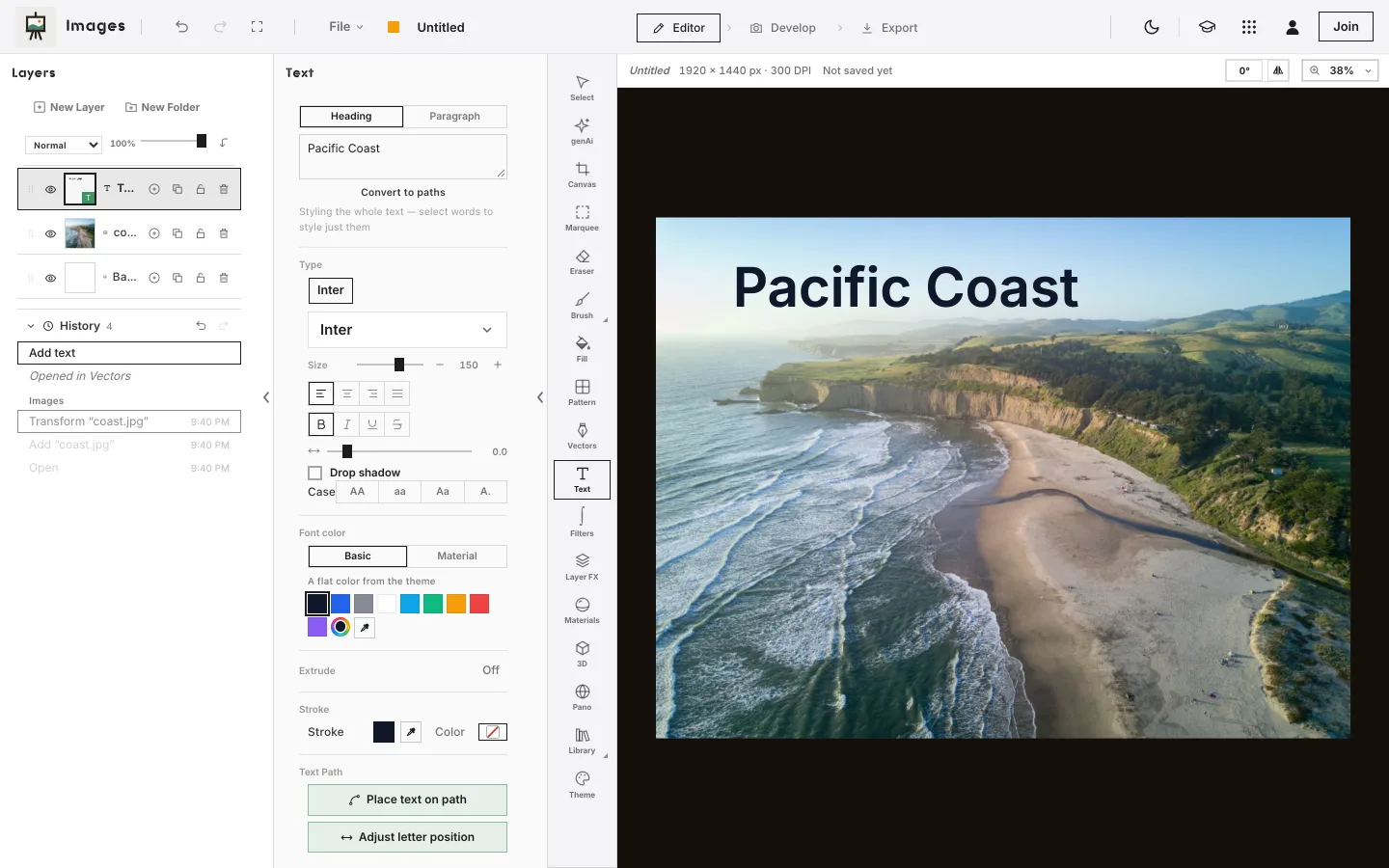
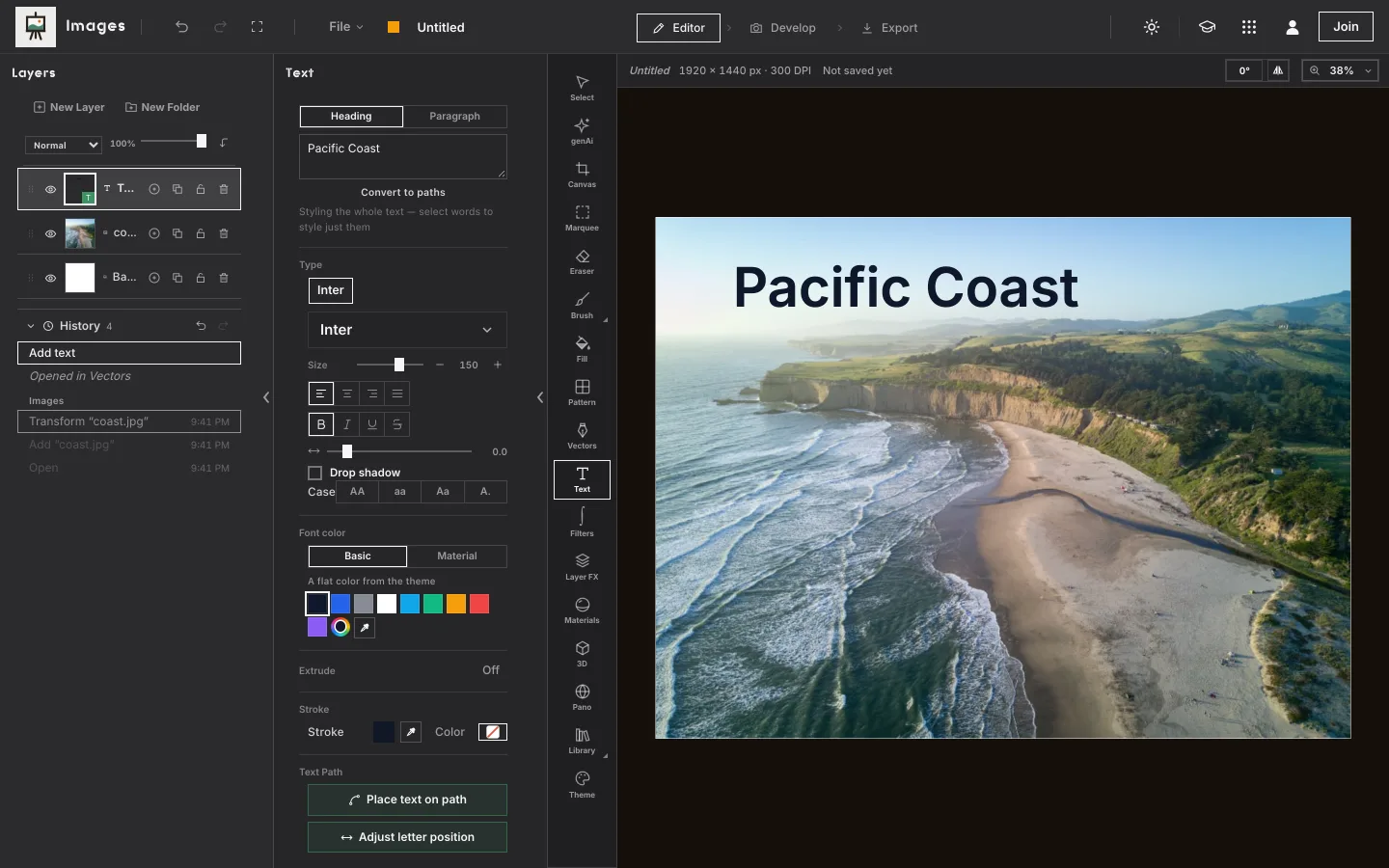
Open it in a Chrome tab with its layers, folders, masks and blend modes, change what you need, and save a PSD back.
A school or shared Chromebook
No account to sign in to and nothing to install. Save your picture to the device before you sign out.
You want layers, free
Cut-outs, color, a title on a photo, a poster: layers, masks and selections cover most of it.
Where Photoshop is the better choice
If your work is professional retouching, compositing or print, Photoshop does a lot that Images doesn't. Plainly:
- It's Photoshop. On the web it runs in Chrome on ChromeOS,1 so on a recent Chromebook you can use Adobe's own app.
- Non-destructive depth. Adjustment and fill layers,4 and Smart Objects you edit without changing the original.5 Images opens a PSD's adjustment layers and smart objects as pixels or leaves them out.
- Print color. A CMYK color mode for commercial printing.6 Images works in RGB: its print PDF carries a color profile, and the printer converts it.
The whole comparison, feature by feature: Photoshop alternative.
What Images does
- Layers: drawing, adjustment, Vectors and 3D layers, folders, sixteen blend modes, opacity, alpha lock and masks that hide without erasing.
- Selections: box, circle, lasso, paint, a magic wand by color or brightness, and Object: click a subject and Images finds its edges.
- Color and light: exposure, curves, levels, HSL, color wheels and a channel mixer on any layer.
- Retouching: clone, retouch and liquify, and layer effects (shadows, outlines, glows) that stay live.
- Exports: PNG, JPEG and WebP, a layered PSD, and a PDF for print with bleed and crop marks.
- Painting too: the full set of brushes, with pen pressure. Drawing on a Chromebook? Procreate on a Chromebook.
- More on a Chromebook: every Weekend Studio app and free tool that runs on one, 3D and websites included.
Photoshop files, honestly
A PSD opens as a new image with its layers. Images lists what it left out as the file opens.
What comes over
Layers, folders, masks, blend modes and opacity. A blend mode Images doesn't have becomes the nearest of its sixteen, and it says which.
What changes
Text layers and smart objects become pixels: they look the same, but the words and contents are no longer editable.
What's left out
Adjustment layers and layer effects (shadows, strokes, glows). Saving a PSD back keeps the layers and masks.
Free, plainly
Images is free. No account and no watermark. Without an account your work is kept in this browser on this Chromebook, so save a copy now and then (File › Save to device…) if it matters to you: clearing the browser's data clears it.
A membership is optional. It adds 100 GB of Cloud storage synced across your devices, sharing and live collaboration, generative AI if you want it, working from your AI assistant (MCP), and posting on Cauchii. What membership adds.
Questions
Can you get Photoshop on a Chromebook?
Photoshop on the web, yes: Adobe lists ChromeOS 102 and later among its systems. Photoshop on desktop is for Windows and macOS, and Adobe says its Android beta isn't available on Chromebooks.
Can I open a PSD on a Chromebook?
Yes. Images opens a PSD in Chrome with its layers, folders, masks, blend modes and opacity, and saves a PSD back. Adjustment layers and layer effects are left out, and text and smart objects become pixels; Images lists what it left out.
Do I need an account or an install?
No. Images is a web page: open it in Chrome and edit. Without an account, your work is kept in your browser on the Chromebook.
Does it work in a guest or incognito window?
It opens and edits there, but what a guest or incognito window keeps is cleared when it closes. Save your picture with File › Save to device… before you close it.
Does it work offline?
No. Images opens from the web, so it needs a connection to start.
Is Weekend Studio connected to Photoshop?
No. Weekend Studio is made by Weekend Industries and has no connection to Photoshop or Adobe. Photoshop is named here only to compare.
Sources
What this page says about Photoshop, and where it comes from. Checked November 25, 2026.
- https://helpx.adobe.com/photoshop/web/get-set-up/learn-the-basics/technical-requirements.html: Photoshop on the web, requirements: ChromeOS 102 and later; Chrome and Edge; 8 GB RAM; incognito may prevent access to disk space.
- https://helpx.adobe.com/photoshop/desktop/get-started/technical-requirements-installation/adobe-photoshop-on-desktop-technical-requirements.html: Photoshop on desktop, requirements: Windows and macOS.
- https://helpx.adobe.com/photoshop/mobile/get-set-up/learn-the-basics/technical-requirements.html: Photoshop on mobile, requirements, Android: “Not available on Android tablets and Chromebooks.”
- https://helpx.adobe.com/photoshop/desktop/create-manage-layers/color-adjustment-fill-layers/work-with-adjustment-and-fill-layers.html: Photoshop help, adjustment and fill layers.
- https://helpx.adobe.com/photoshop/desktop/create-manage-layers/smart-objects/create-embedded-smart-objects.html: Photoshop help, Smart Objects.
- https://helpx.adobe.com/photoshop/desktop/adjust-color/choose-colors/color-modes-in-photoshop.html: Photoshop help, color modes: CMYK for commercial printing.
Adobe and Photoshop are either registered trademarks or trademarks of Adobe in the United States and/or other countries, named here only to compare. Chromebook and ChromeOS are trademarks of Google LLC. Weekend Studio isn't affiliated with, endorsed by or sponsored by Adobe or Google. Seen something out of date? Tell us and we'll fix it.