
Weekend Studio · Tools
PBR Texture Generator
Turn one photo, or a procedural, into every map a physically based material needs. Free, in your browser, no account needed.
- Free
- No account
- Runs in your browser
- 16-bit height
- OpenGL + DirectX normals
- Seamless
Eight maps from one texture
Named the way 3D programs expect. These are the generator's own maps of its Bricks procedural.
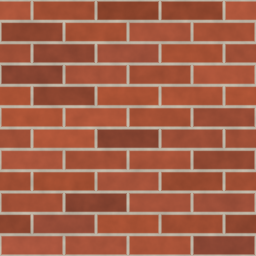
Base color
basecolor.pngThe surface's color, with Remove light to take baked-in shading off a photo.
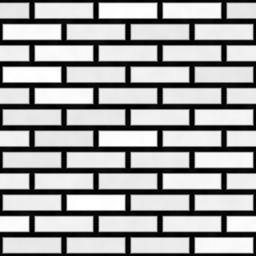
Height
height.pngA 16-bit grayscale PNG, so displacement doesn't band. Use it as a displacement map or a bump map.
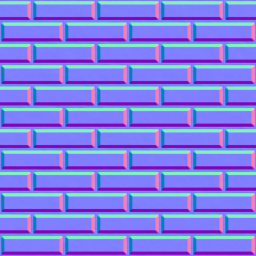
Normal (OpenGL)
normal_gl.pngFor Blender, Unity and Godot.
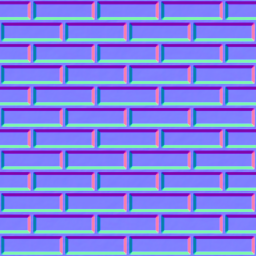
Normal (DirectX)
normal_dx.pngFor Unreal Engine. The same normals with green flipped.
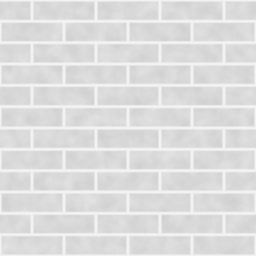
Roughness
roughness.pngWhere the surface is matte and where it shines.
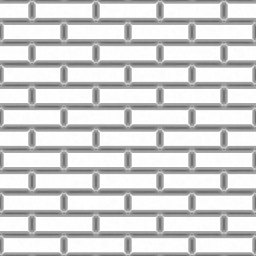
AO
ao.pngAmbient occlusion: the soft shadow in cracks and corners.

Metalness
metallic.pngWhich parts are metal. Brick isn't, so it's black.
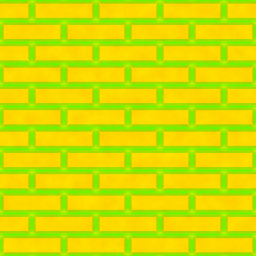
ORM
orm.pngAO, roughness and metalness packed into red, green and blue.
Every map has adjustments of its own, such as strength, blur, contrast and invert, and you tick the ones to save.
Start from anything
A picture
A color photo, a height map or a normal map. The generator guesses which, and you can change it.
A procedural
Bricks, tiles, hexagons, stones, fabric, marble, wood, water and noise, each with its own settings.
The library
A ready material from Weekend Studio's library to start from.
AI, if you want it
Describe a texture and generate one. It needs a log in, and work made this way is labeled AI.
Seamless, tileable textures
Tiling makes the maps repeat without a visible join. Blend edges blends the picture's own edges, in one of three ways:
- Straight
- An even band along each edge. Fine grain, noise, fabric, sand.
- Irregular
- The band wanders, so no straight line shows. Stone, dirt, bark, plaster.
- Follows detail
- The brighter picture wins where they meet, so shapes stay whole. Bricks, pebbles, planks.
Repeat is for bricks, tiles and planks. Put a box round one repeat, turn it if the photo is at an angle, and pick Grid, Brick or Half-drop. The maps are made from that box, repeated exactly. Find repeat sizes the box for you.
How to use it
Add a texture
Drop a photo onto the generator, or choose a procedural.
Say what it is
Color, height or normal. Then adjust each map while you watch the lit preview.
Make it tile
Set Tiling to Blend edges or Repeat if the texture will repeat.
Save
Tick the maps you want and choose Save to device: one PNG, or a zip of the set.
See it lit before you export
The preview puts the material on a sphere, cube, cylinder or plane, or shows it flat, lit by real HDRI environments. Displacement shows the height as real depth.
Custom previews the material on your own model, which stays on your device. It opens the same files as the 3D file converter:
- GLB
.glb - glTF
.gltf - FBX
.fbx - OBJ
.obj - STL
.stl - PLY
.ply - 3MF
.3mf - DAE (Collada)
.dae - USDZ
.usdz - USDA
.usda - USDC
.usdc - USD
.usd - 3DS
.3ds
Solo on any map shows that map alone on the shape, unlit and as its picture, so seams and detail are easy to check. It changes nothing you save.
Made for your 3D workflow
For 3D artists, game artists and anyone texturing in Blender, Unreal Engine, Unity or Godot who needs a quick, clean map set without installing anything. It runs on computers, tablets and phones.
- Blender
- Unreal Engine
- Unity
- Godot
Questions
Is it free?
Yes. It runs in your browser with no account, and saving the maps to your device is free.
Can I make just a normal map?
Yes, it works as a normal map generator on its own. Drop in a photo or a height map, tick only the normal map, and save it as one PNG, in OpenGL or DirectX. The height map works as a bump map or a displacement map the same way.
Should I use the OpenGL or the DirectX normal map?
Blender, Unity and Godot read OpenGL normal maps. Unreal Engine reads DirectX. The generator saves both, so pick the one your program expects.
What is an ORM map?
One picture holding three maps: ambient occlusion in red, roughness in green and metalness in blue. Unreal Engine and glTF materials can read it, which saves two texture slots.
Can I preview the texture on my own model?
Yes. Pick Custom beside the shapes, or drop a GLB, OBJ, FBX, STL or other 3D file on the preview, and the material goes on every part of it. The model stays on your device and is forgotten when you leave. It needs UVs, the texture coordinates most models carry; one without them is refused with a note.
Is my photo uploaded?
No. The maps are made in your browser, on your device, and saved straight to it. Only the AI source sends anything: the words you type.
Use it in 3D
The maps you save work in Blender, Unreal Engine, Unity, Godot and Weekend Studio 3D. In Weekend Studio Tools, members can also keep the whole set as one 3D material, ready to add to a scene in 3D under Materials › Saved.
Open 3DConvert your model
The free 3D file converter opens FBX, OBJ, STL, GLB, glTF, USDZ and more, fixes the up axis and units, and saves as another format. The PBR Texture Generator and the converter are among the free Widgets in Weekend Studio Tools.
Convert a model Open Tools Read the Tools docs