
Weekend Studio · Vectors
A free Illustrator alternative in your browser
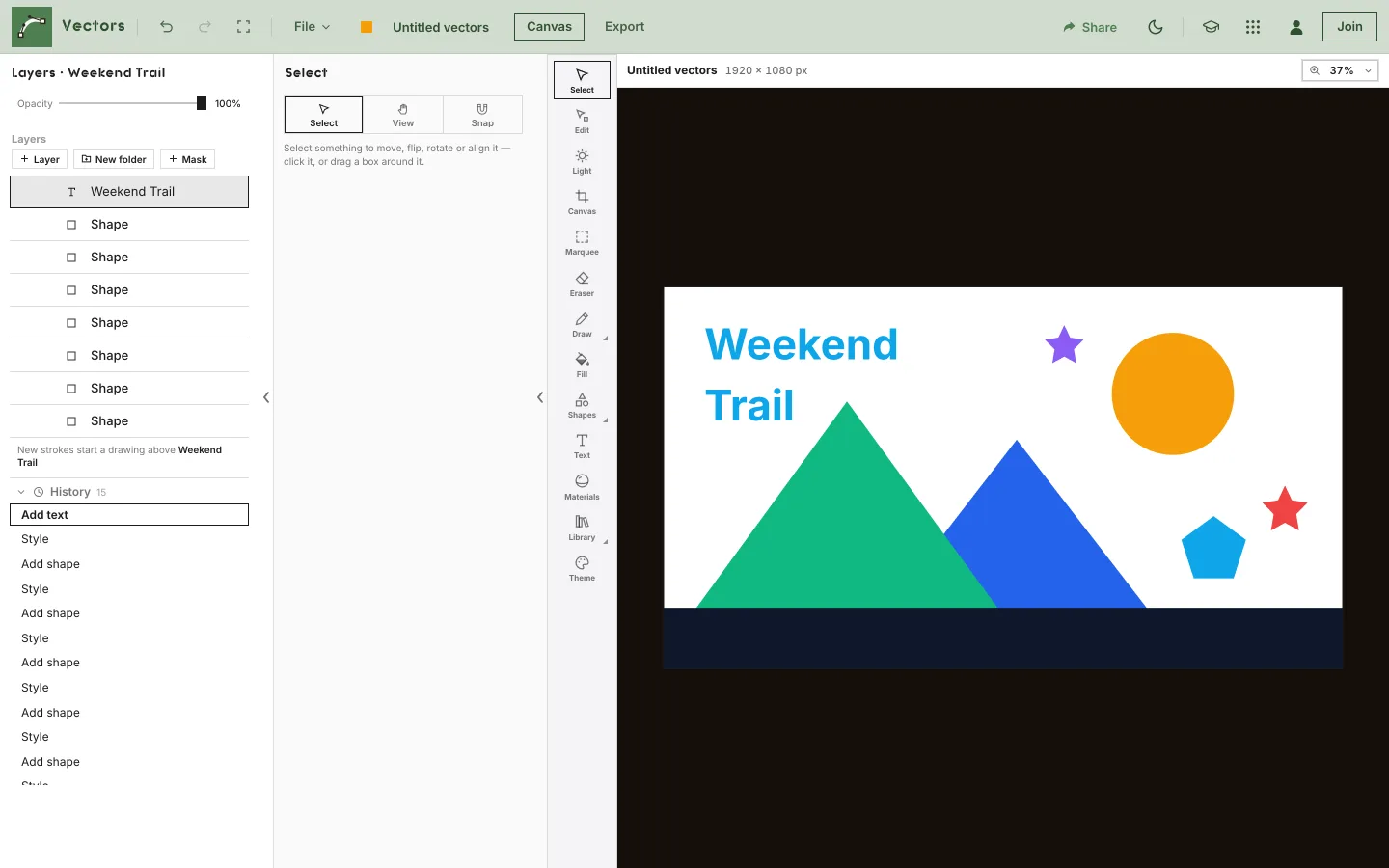
Vectors, Weekend Studio's illustration app, draws paths, shapes and text that stay editable at any size, in a web browser. It opens SVG files as shapes and saves SVG and print-ready PDF. Free, with no account.
Open Vectors See the comparison
- Free
- No account
- SVG in and out
- Print PDF
Who this is for
You need a logo, an icon or a poster
Shapes, paths and text that scale cleanly, saved as SVG for the web or a PDF a print shop can open.
You draw on an iPad or a Chromebook
Freehand strokes follow Apple Pencil pressure and become editable paths. Nothing to install.
You have SVGs to fix
Open an SVG and its parts come in as shapes and text you can edit, not as a flat picture.
Where Illustrator is the better choice
If you do vector work for design and print, Adobe Illustrator does a lot that Vectors doesn't. Plainly:
- Image Trace turns a raster picture into editable vector artwork.1
- Many artboards in one file, for several designs side by side.2 A Vectors drawing has one page.
- Shape Builder and Pathfinder for merging and dividing overlapping shapes,3,4 and a perspective grid for drawing in perspective.5
- Typography: OpenType features such as alternate glyphs,6 fonts from Adobe Fonts,7 and Retype, which identifies fonts in pictures.8
- Files: its own .ai format,9 and saving or exporting to many more, including EPS, PDF, SVG, DWG and DXF.10
- Desktop and iPad apps, and Illustrator on the web in beta.11,12
What Vectors does
- Drawing: a pen tool with Bézier handles, freehand strokes that follow pen pressure, and point editing with corners, curves, cut and round.
- Shapes: ten of them, from rectangles and stars to arrows, with corners, strokes and fills.
- Live modifiers: a cloner (grid, line, circle or path), symmetry, and a boolean (unite, subtract, intersect, exclude) that keep working as you change what's inside.
- Text: headings that follow a path, paragraphs with lists, letter-by-letter adjusting, extrude for depth, and convert to paths.
- Color and light: colors and saved materials, and one light for the drawing that gives every shape a matching highlight and shadow.
- Layers: folders, masks, lock, solo, and grouping or sealing objects as one.
- SVG and PDF: opens SVG as editable shapes; saves SVG, and a print PDF that keeps shapes, gradients and masks as vectors and each layer as a PDF layer, with bleed and crop marks.
Good to know first
Plainly, the limits you'd notice coming from a desktop vector app.
One page per drawing
A drawing has one page, which you crop, extend or resize. Several sizes of the same design come from the Export module: one crop per size, all at once.
No .ai files
Vectors opens .vectors files and SVG. Save an SVG from another app to bring work in. Filters, clipping paths and embedded pictures in an SVG are left out, and a notice says so.
Text in a print PDF
Text becomes letter outlines in the PDF, so a print shop doesn't need your fonts. In SVG and in Vectors, it stays editable text.
Side by side
Illustrator's facts are from its own website and help pages, as of November 2026.
| Vectors (Weekend Studio) | Illustrator | |
|---|---|---|
| Runs on | A web browser on Windows, ChromeOS, Android, macOS, Linux and iPadOS, and phones with their own layout. | Windows and macOS;13 iPad;11 the web in beta, in Chrome or Edge.12 |
| Own file | .vectors (opens anywhere with every picture and font inside). | .ai.9 |
| Opens | .vectors and SVG. | AI, PDF, EPS, SVG and more.10 |
| Saves | SVG, PNG, JPG, WebP, and a print PDF with layers. | AI, PDF, EPS, SVG; exports PNG, JPEG, DWG, DXF, PSD and more.10 |
| Pages | One per drawing. | Multiple artboards.2 |
| AI | Only if you ask, on your device, and anything it draws is labeled. A picture brought in from outside is labeled too. | Generative features such as Text to Vector Graphic and Generative Recolor.14 |
Free, plainly
Vectors is free. No account and no watermark. Without an account your drawings save in this browser on this device; Save to device… keeps a .vectors file you can open anywhere.
A membership is optional. It adds 100 GB of Cloud storage synced across your devices, sharing and live collaboration, generative AI if you want it, working from your AI assistant (MCP), and posting on Cauchii. Its price shows in your own currency when you choose Log in in the bar above and become a member, and it renews until you cancel. What membership adds.
Questions
Is Vectors really free?
Yes. Vectors works in your browser with no account, and your drawings are kept on your device. A paid membership adds Cloud, sharing and drawing together live.
Can it open Illustrator files?
Not .ai files. Save your artwork as SVG and Vectors opens it as editable shapes and text.
Can a print shop use what I make?
Yes. Export › PDF keeps shapes, gradients and masks as vectors and each layer as a PDF layer, with bleed and crop marks. Text becomes letter outlines, so the shop doesn't need your fonts.
Does it work with Apple Pencil?
Yes. Freehand strokes follow its pressure, and once you've used the Pencil your fingers move and zoom the canvas.
Does it work offline?
No. Vectors opens from the web, so it needs a connection to start. A .vectors file you save opens again without one.
Is Weekend Studio connected to Illustrator?
No. Weekend Studio is made by Weekend Industries and has no connection to Illustrator or Adobe. Illustrator is named here only to compare.
Sources
What this page says about Illustrator, and where it comes from. Checked November 16, 2026.
- https://helpx.adobe.com/illustrator/desktop/manage-objects/traces-mockups-symbols/image-trace-panel-options.html: Illustrator help, Image Trace.
- https://helpx.adobe.com/illustrator/desktop/create-manage-artboards/add-edit-artboards/introduction-to-artboards.html: Illustrator help, multiple artboards.
- https://helpx.adobe.com/illustrator/desktop/manage-objects/reshape-transform-objects/create-shapes-using-the-shape-builder-tool.html: Illustrator help, the Shape Builder tool.
- https://helpx.adobe.com/illustrator/desktop/manage-objects/reshape-transform-objects/pathfinder-panel-overview.html: Illustrator help, the Pathfinder panel.
- https://helpx.adobe.com/illustrator/desktop/manage-objects/reshape-transform-objects/about-perspective-drawing.html: Illustrator help, the perspective grid.
- https://helpx.adobe.com/illustrator/desktop/design-with-text/special-characters-glyphs/format-text-with-opentype-features.html: Illustrator help, OpenType features.
- https://helpx.adobe.com/illustrator/desktop/design-with-text/fonts-and-scripts/find-and-apply-fonts.html: Illustrator help, fonts from Adobe Fonts.
- https://helpx.adobe.com/illustrator/desktop/design-with-text/fonts-and-scripts/identify-fonts-using-retype.html: Illustrator help, Retype.
- https://www.adobe.com/creativecloud/file-types/image/vector/ai-file.html: Adobe: AI is the native vector file type for Illustrator.
- https://helpx.adobe.com/illustrator/desktop/get-started/learn-the-basics/supported-file-formats-in-illustrator.html: Illustrator help, supported file formats.
- https://www.adobe.com/products/illustrator/plans.html: Adobe Illustrator: "for desktop, iPad and web".
- https://helpx.adobe.com/illustrator/web/get-set-up/access-the-app/access-illustrator-web.html: Illustrator help: Illustrator on the web (Beta), in Chrome or Microsoft Edge.
- https://helpx.adobe.com/illustrator/desktop/get-started/learn-the-basics/technical-requirements.html: Illustrator on desktop, requirements: Windows and macOS.
- https://helpx.adobe.com/illustrator/desktop/use-generative-ai/generative-ai-faq-illustrator.html: Illustrator help, generative AI: Text to Vector Graphic, Generative Recolor and more.
Adobe, Illustrator, Lightroom, and Photoshop are either registered trademarks or trademarks of Adobe in the United States and/or other countries, named here only to compare. Weekend Studio isn't affiliated with, endorsed by or sponsored by Adobe. Seen something out of date? Tell us and we'll fix it.